As a team leader or executive, you want to spend your time making strategic decisions. You want to focus on growing your business and leading your team, not spending hours digging through complex databases or writing SQL queries.
When your business first starts out, a few basic spreadsheets might be enough. You only have one or two data sources, so it is easy to find what you are looking for. However, as your organization scales, that simple setup quickly turns into a confusing mess. You end up with too many disconnected SaaS tools, giant data warehouses, and manual reports that take up your precious time.
You soon find yourself wasting hours every single week jumping between different platforms. You check your CRM for sales data, export a massive CSV file to look at trends, open a blank document to write a summary, and then try to feed fragments of that data into a standard AI chatbot to make sense of it. Doing all of this manually takes up too much time and energy. It drains your daily focus. Instead of acting on insights that actually grow the business, you stress over administrative data gathering.
Arcli is a platform made to fix this exact problem. It positions itself as an operational orchestration tool, and it is designed perfectly for the needs of teams drowning in data. But here is the secret: you do not have to be a software engineer or a data scientist to use it. It works perfectly for almost any department leader. Whether you are in marketing, finance, or operations, if you want a simple, all-in-one place to turn your private data into actionable insights, this tool fits the bill.
As someone who understands the real struggles of managing business data, here is an honest breakdown of how Arcli works, the problems it solves, and why it is a smart choice for your daily workflow.
1. Noise-Free Operations Without the Clutter
Many software tools on the market are built with too much complexity. They are packed with complex features, drop-down menus, and confusing charts that just get in the way when you are trying to find a simple answer. Arcli removes all of that clutter and keeps things very simple. It respects your time.
When you log into the platform, you do not have to jump through hoops to understand what is happening. The dashboard, called the Command Center, skips the complicated settings and only tracks the vital signs you actually care about:
- Connected Sources
- Active Agents
- Total Queries
- System Health
.webp) The Command Center skips the complicated metrics and only surfaces the operational vital signs your team actually cares about.
The Command Center skips the complicated metrics and only surfaces the operational vital signs your team actually cares about.
The best part of this dashboard is the Pinned Executive Insights. Instead of opening different folders or dashboards to see what is going wrong today, Arcli’s engine proactively monitors your data in the background. If it spots a problem or an opportunity, it pushes that insight straight to the top of your screen so you know exactly what to focus on.
2. Fast Insights and Live Data Integrations
Once your data is generated, you need to analyze it. Getting answers should never be a hard or confusing process, and Arcli makes sure it isn't.
Think about how you probably use AI now. You might use a messy process where you copy and paste text into ChatGPT, make sure you don't leak sensitive data, and hope the AI remembers the rules.
Arcli stops all of that extra work by acting as a highly secure, private Knowledge Hub. While you can drag and drop flat files (like PDFs or CSVs), the real power lies in its Integration Library. You can plug Arcli directly into your live data sources without writing any custom API scripts. It supports native connections to Data Warehouses (like Snowflake, BigQuery, and Redshift), Databases (like PostgreSQL and DuckDB), and everyday Apps (like Stripe, Salesforce, and HubSpot).
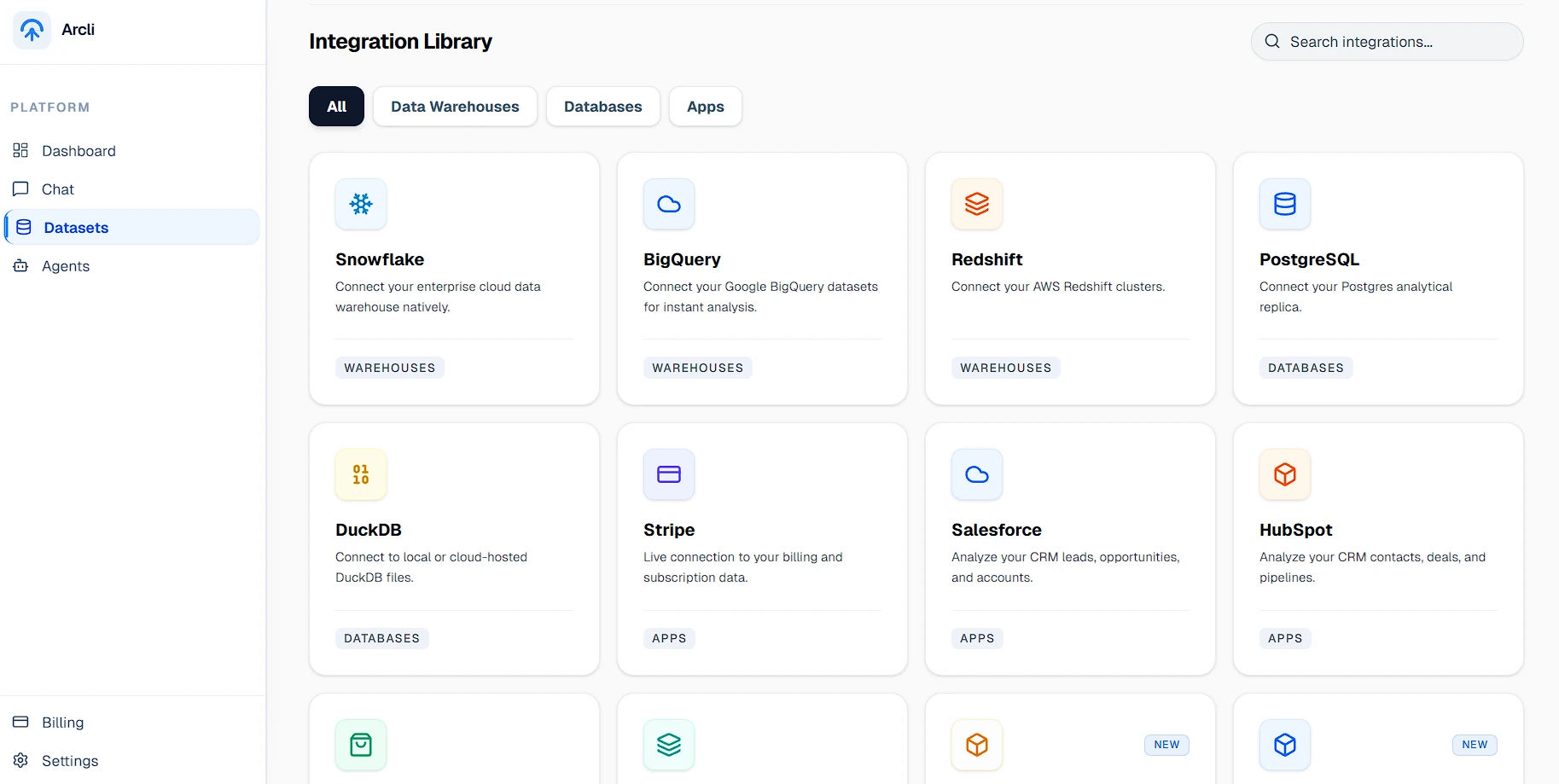 The Integration Library allows you to connect directly to your live databases, data warehouses, and SaaS apps without writing any code.
Security is always a massive concern when handing over live database credentials. Arcli handles this perfectly for peace of mind. When you connect a database like PostgreSQL, your host, port, and password keys are instantly secured using AES-256 encryption and locked in a private vault prior to storage. Because the app securely reads your live business context, the AI automatically gives you exact answers based on real-time data, virtually eliminating the risk of the AI making things up.
3. The "AI Workforce" Feature (The Best Part of the App)
This is the specific feature that makes Arcli much better than a basic AI chatbot. As you use AI more, you will quickly learn a hard truth: a single, general chatbot is not good at everything. A bot trying to do financial math is going to struggle if it uses the same logic it uses to write marketing copy.
Arcli has a special Agents screen built into the app to help you manage this. Instead of a single bot, it lets you deploy specialized, autonomous agents tailored to your exact team.
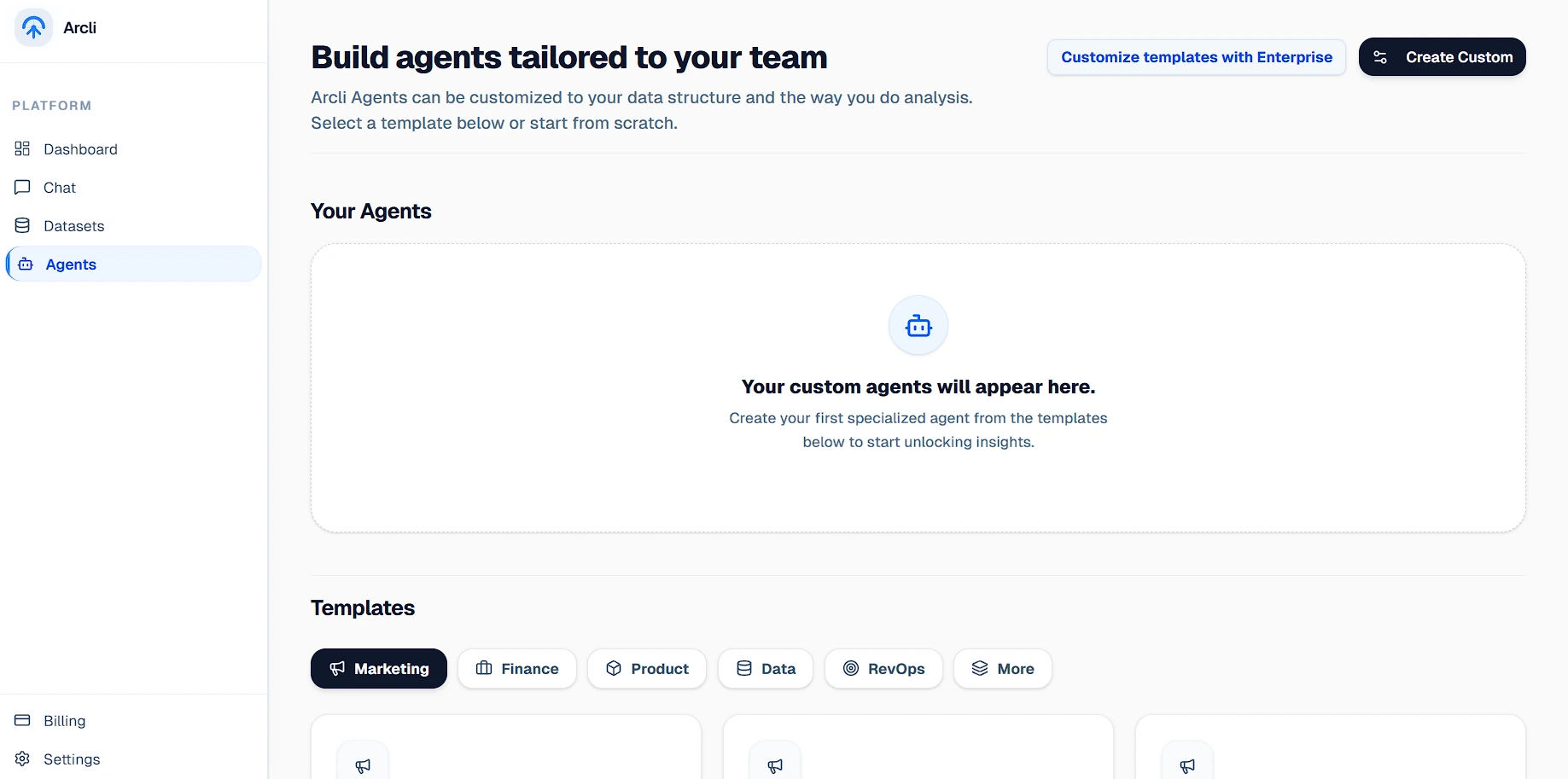 The Agents dashboard allows you to deploy custom, specialized AI assistants built for specific departments like Finance, Marketing, and RevOps.
It offers out-of-the-box templates for Marketing, Finance, Product, and Data. If you have a specific way you need marketing data analyzed, you can build an agent just for that. This takes the frustration out of prompting. It helps you quickly assign specialized AI workers to the right datasets so you get high-quality answers every single time.
4. Plain English Queries (Knowing Your Numbers)
To make good decisions, you need to understand your data. But writing SQL queries or building complex math formulas in Excel is tiring, and many managers avoid looking deeply at their numbers because it is too confusing.
Arcli has a Document Intelligence Workspace that turns your data into easy-to-read answers without needing any formulas. You just type what you want to know in plain English. This completely removes the technical barrier, keeping you organized and helping you pull complex reports or generate precise charts with total confidence.
5. Why Arcli Beats General AI Chatbots
You might wonder why you should pay for an app when tools like ChatGPT or Claude are readily available. The simple answer is that your data security and your time are worth money.
A standard chatbot is just an empty prompt box. If you want to use it for deep business analysis, you have to build the context yourself every single time. You have to update it manually, worry about data privacy, and check every output for mistakes.
Arcli gives you a ready-to-use system on day one. Everything is already connected for you. When a live database is hooked up, it turns into a searchable asset. When you ask a question, specialized agents pull directly from your exact data. The app works for you, so you do not have to act as a prompt engineer for the app.
6. Clear, Fair, and Honest Pricing
Many enterprise software tools hide their prices behind "Book a Demo" buttons or expensive yearly contracts. They might let you connect basic data, but charge thousands for actual analysis. Arcli keeps its pricing very transparent and fair for growing teams.
- Starter Plan ($0/mo): You get a free local exploratory sandbox. It gives you 1GB of storage and 1,000 queries per month to try out the dashboard, connect your real data, and see if you actually like the workflow before paying a single dollar.
- Professional Plan ($49/mo): After you scale, it costs a flat $49 a month for production operations. This gives you 50GB of edge storage, 50,000 queries, fast-path compute, and access to the Advanced Anomaly Engine. There are no hidden fees.
- Enterprise Plan (Custom): Built for massive teams needing unlimited storage, bespoke cloud architectures, and dedicated engineers. Arcli's infrastructure pricing is fully transparent, offering a highly capable free tier and a powerful $49/mo Pro plan.
Our Final Opinion
If you are an executive or team leader who is tired of jumping between different apps and messy dashboards just to run your daily operations, Arcli is a fantastic choice. It is a clean, beautiful app that is very easy to learn. You do not need hours of free time or a computer science degree to figure out how to use it.
The AI Workforce templates alone make it worth the $49 cost because it allows you to build custom agents for exactly what your team needs. By weeding out the bad data and complicated setups, you save yourself hours of stress and frustration. For less than the cost of a single software subscription, you get a simple, powerful space to organize your data, pull reports in seconds, and protect your time.
It is time to stop stressing over endless data gathering. Start managing your work from a proper, organized Command Center so you can get back to doing the strategic work that you actually love.


